Sunday, May 14, 2017

McAfee AntiVirus Plus 2017

Deal available on sharewareonsale.

McAfee AntiVirus Plus, now available with revolutionary Active Protection technology, offers essential PC security with accelerated performance and helps keeps you safe from viruses, spyware and hackers. Features include anti-virus, firewall, privacy protection, PC optimization, web protection, and WiFi network monitor. Get it now!

What’s Included?

Award-Winning Anti-Virus Protection
  • Stay safe from Trojans, viruses, spyware, rootkits, and more, with state-of-the-art anti-malware protection
  • Detects, quarantines, and blocks viruses and malware to prevent damage to your PC
  • Keep zero-day threats and botnets at bay—McAfee Active Protection™ and Global Threat Intelligence technology have you covered
Privacy and PC Optimization Tools
  • Identifies software in need of updating by checking the version on your PC against our database using Vulnerability Scanner
  • Deletes unnecessary cookies and temporary internet files that slow down your PC with McAfee® QuickClean™
  • Securely destroy sensitive files, such as tax documents, with McAfee® Shredder™
Wi-Fi Protection
  • Two-Way Firewall system monitors and stops traffic in and out of your PC trying to connect to suspicious servers and known Botnets
  • Web Protection
    • Helps you make smarter decisions about what you click, and protects you from malicious downloads
    Network Manager
    • Monitor your home Wi-Fi network even when you’re not home
    • Blocks unknown devices from accessing your Wi-Fi
    • Prevents others from eavesdropping on your internet usage

Go to this page for download
https://sharewareonsale.com/s/mcafee-antivirus-plus-giveaway-coupon-sale

YOUR DOWNLOADYour download will start automatically, or you can manually download from the link below.
Download: SharewareOnSale_Giveaway_McAfee_AntiVirus_Plus_2017_hub.exe

DIRECTIONS

To get your free copy of McAfee AntiVirus Plus 2017, click here to go to the giveaway page, enter your email address (if you've gotten this before, you will need a new email address), pick a password, and click ACCEPT & CONTINUE and then click PLACE MY ORDER. At the next screen, hit the GET MY TRIAL button. Next, hit DOWNLOAD and you will be given your license key at the next screen. Now download and install McAfee AntiVirus Plus 2017 and activate it with your license key

IOBIT APPLOCK PRO (100% DISCOUNT)

Deal available on sharewareonsale.

IObit Applock newly added 【Fingerprint Lock】 and 【Screen Lock】 for your privacy protection! We also optimized 【Face Lock】, added several well-designed and beautiful Lock Themes, ENJOY!
Please note that Fingerprint Lock only supports Android 6.0+ devices with fingerprint sensor.

★#1 Face Lock app with average ratings of 4.5 on Google Play!
★Supported 13 languages

How IObit Applock protects your privacy and data security:
✔Lock system settings, switches and any private app
✔Face Lock and unlock apps easy and fast without password
✔Fake Lock disguises the lock screen with fun covers
✔Fingerprint Lock for more secure lock and fast unlock
✔Screen Lock locks your device screen
✔Hide private content from notification
✔Catch snooper’s photo and notify by email
✔Customized Delay Lock to avoid frequently unlock
✔Efficiently protect your most used apps
✔Tablet and Android 6.0 are supported

Friday, May 12, 2017

Online Deal–For Indians

Online sites are ready for big sale.
Dates for sale are 11th May 2017 to 14th May 2017 on amazon and 14th May 2017 to 18th May 2017 on Jabong, Myntra and Flipkart.

Jabong Sale :- http://destyy.com/qSrQES

http://destyy.com/qSrW2D

http://destyy.com/qSrE2F

Flipkart Page :- http://destyy.com/qSrRAF

Amazon Page :- http://destyy.com/qSrR2h

If you find good deal, you can buy it.

Monday, February 8, 2016

Earn Money On Amazon by Simple Trick

Earn Money On Amazon by Simple Trick


Amazon want to become number one online shopping site. At present war is going on between Flipkart & Amazon. Its is the perfect time for buyers who like to shop online
Amazon have some plus points. If your product is under “Amazon Fulfilled” you are eligible for got 100% cash back or refund at in given period (Read Fulfilled Policy).
Now Amazon double the Referral incentive. If somebody join by referral link you are eligible for RS.400 gift card, and that person who joins amazon by your referral got RS.200 gift voucher.
Friend or Relative need to create account by referral link and When he or she purchase something more than RS.599 you are eligible for voucher.
So, How we take some advantage of this? Just Follow the Steps.

If you have already amazon account, no problem its works for everybody, but follow it carefully.

Create new account by using other person Referral Link.

http://amzn.to/1Kx3cNW
Now Click on it and Make new amazon account. If you purchase anything more than RS.599 You will 101% Get RS.200 Cash back as a gift card in your account.
You can send as many as referral link possible to your friends, family and relatives.
Use My Link for time creating a new account, Then send your link to others.

Wednesday, July 1, 2015

Xperia Labs Balloon Photo beta(without become a beta tester)


Ashampoo_Snap_2015.07.01_18h40m34s_001_

Notes / What's New
Uploader's notes:
Description
Relive the good times captured in your photos with speech balloons!
Preparation
Please note that a network connection is required for voice recognition.
Optionally you may download an offline dictionary for voice recognition.
These are the steps for downloading the offline dictionary:
1. Launch your device's "Settings" app
2. Select "Language and input"
3. Tap the settings icon next to "Google Voice Typing" or tap "Google Voice Typing" if you are on Android 5.0 or higher
4. Tap "Offline Speech Recognition"
5. Tap "All" and then tap your desired language do download it
1. Let's take photos
1. Launch balloon photo(beta)
2. On viewfinder, voice recognition is running continuously. Let's talk at your desired timing.
Every time the device succeeds in recognizing words, speech balloon will appear.
3. Tap the camera key to take photos at your desired timing.
Speech balloons which are spoken from 5 minutes before and after shooting are also saved.
2. Let's select a photo
1. Tap Editor button on viewfinder, then photo selector screen is launched. You can also launch it directly from launcher.
2. Select a photo to be combined with speech balloon.
3. Let's save photo with balloon
1. Edit balloons.
Move balloon: Drag balloon.
Edit text of balloon: Tap balloon and then tap pencil button at left top
Delete balloon: Tap balloon and then tap X button at right top
Add new balloon: Tap right bottom button on editor screen, then input words.
2. Tap save button at right center on editor screen. Then the photo with speech balloons is saved.
*On-screen instructions and menus are available in English and Japanese.
*This application uses Google Analytics to collect and aggregate usage statistics in order to help us improve the application and our services. None of this data can be used to identify you.
*This App is being provided as a “Public Beta”, and is made available on an “AS IS” and “AS AVAILABLE” basis.
*Xperia is a trademark or registered trademark of Sony Mobile Communications Inc.

Download
LINK 1 
LINK 2

Amazon daily deals,sometimes better than Flipkart and others ???

Hello Friends... 


As a online shopper we all buy most of the products from Flipkart. Before using Amazon I think that its a best online shopping site , but amazon comes as strong competitor. 

I am compared some products on Amazon & Flipkart on different times and days, and found that many times amazon have better discounts. When you are buying something its better always cross check the same product on both sites. 

For Example 

Samsung 23H4003 58 cm (23) LED TV on Flipkart (11,990 Rs)
http://fkrt.it/cZ4SgmNN


Samsung 23H4003 58 cm (23) LED TV on Amazon (11,293 Rs)
http://amzn.to/1f0GOy8

Another example is there

Sony Xperia Z1 Purple, 16 GB on Flipkart (27,180 Rs)

Sony Xperia Z1 Purple, 16 GB on Amazon (26,500 Rs)
http://amzn.to/1JuDNQO

You can see many products with huge price difference on both sites. If you are getting same product on lower price on amazon with amazon fulfilled policy then there is no reason to avoid purchase from amazon in my view. 

Every online shopper knows about amazon.com, its a global online shopping sites and keep working hard in India to compete with flipkart. But still flipkrat is number one. 

Flipkart have very good features for there customer like "advantage sellers", "Wallet balance for WS Retailers", "Flipkart first" and many more. Amazon also going well. Now they started "pickup your product from your nearest location". 

Amazon Global :- http://amzn.to/1INn5cl
Amazon India :- http://amzn.to/1KP8SOG

Hope you compare and enjoy the discounts in Online shopping war between giants of online shopping. 

5 fixes for Failing to update to the latest builds of Windows 10

The last couple of days have been very fun for excited Windows Insiders who’ve received not one, but two brand new Windows 10 builds to try out. Unfortunately, things aren’t going smoothly for everyone, so we’re here with some helpful suggestions.
The latest builds, numbers 10158 and 10159, offer lots of stability improvements, user interface polish, a couple of small new features, and so on. It’s no wonder that many want to have them installed as quickly as possible.
But in case your update isn’t going as planned here are some things to try:

Make sure you’re signed in with your Microsoft Account

This one’s a big deal, as going forward from build 10130, you’ll need to be logged in with your Microsoft Account. After upgrading to new builds you’ll be able to use local accounts once again, but during the upgrade, you must be signed in so Microsoft can do some licensing magic on the backend. If you’re not signed in with MSA you won’t get the updates.
In case you are signed in, but still don’t see the upgrade, make sure your account is verified on that machine. You can check this by going to Settings -> Accounts and look for a Verify button. If it’s not there it means you’re already verified. If it is, you need to click it and follow the on-screen instructions. Restart and try the update again.
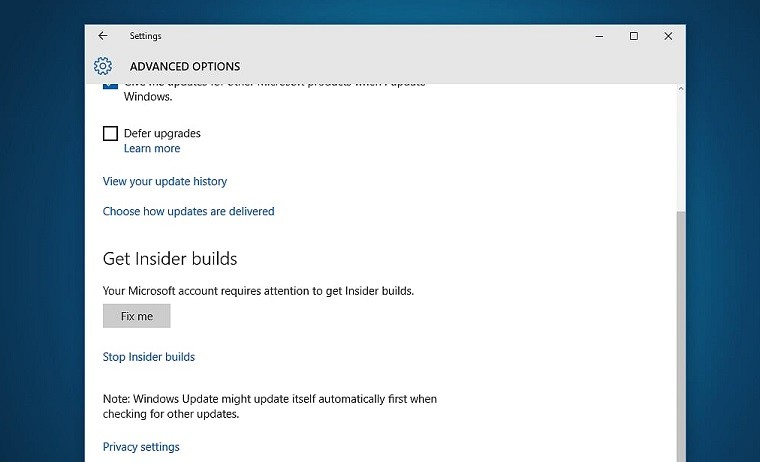
Look for the Fix me button!

Fix your Microsoft Account

We came upon a related issue yesterday when trying to update one of our machines. Even with everything seemingly OK with the Microsoft Account, Windows did not want to update.
One thing you can try is going to Settings-> Update and Security -> Windows Update -> Advanced Options and look for the “Fix me” button. If it’s there, hit it and wait for the machine to do its thing. Restart and try updating again.

Make sure you’re on the Fast Ring

We know this is “Insider 101” stuff but double check to see if you’re in the Fast Ring - the only ring that’s publicly getting the builds for now. Some updates set the ring to Slow by default, so even if you’re previously set it to Fast, you might want to check again.
This "Stuck on Slow" problem was wreaking havoc on our Notification Center

In case you’re stuck on the Slow Ring…

This is a weird and extremely annoying bug. We came across it when trying to update a machine running the leaked build 10147. Changing between rings isn’t possible, and selecting Fast simply doesn’t get saved, hence you can’t get the new builds.
To fix this you’ll need to open an elevated Command Prompt and type:
  • reg flags HKLM\Software\Microsoft\WindowsSelfHost\Applicability set DONT_VIRTUALIZE
  • Hit Enter, let the machine do its thing, restart and try updating again.
A big thank you to Gabe Aul for saving us from that one!

In case you’re hitting various errors, update gets stuck or update still doesn’t show up

If you’re getting stuck at “Downloading Updates 0%” or running into various error codes, read on as this might be of great use to you. Also, users on 32-bit machines (x86) seemed to be especially affected by issues where the new builds simply wouldn’t show up. This tricks seems to help in many of those cases as well.
All you need to do is restart the Windows Update service. The simplest way of doing this is:
  • Press Ctrl+ Shift+ Escape for Task Manager to show up.
  • Hit the “More details” button
  • Go to the Services tab
  • Look for wuauserv (you can easily do this by hitting W+U twice in a quick succession)
  • Right click on the service and hit Restart
Try updating again – you may even find the download has already finished so you don’t need to wait for the whole process again.

If all else fails…

If nothing in the above list has helped we simply recommend being patient. Things like these have a tendency to work themselves out in a couple of days, or Microsoft may push an update to take care of some problems.
If you’re just too excited and the option above is in no way acceptable to you, then you have two options left:
  • Revert to an older build with an official ISO out – preferably by doing a clean install. This might help with almost any problem.
  • Go forward by searching online for an unofficial ISO of the new builds and install from those. This isn’t recommended, but if all else fairs it might be your only option. At least try and make sure it comes from a trusted source, and the Windows image hasn’t been tampered with.

That’s it. We’ve used all of these on various machines and they’ve worked wonders. Hopefully one of them helps you get on the latest build of Windows 10 as well.

Source and Credits :- www.neowin.net


Tuesday, June 23, 2015

Xperia social life new feature

Sony Mobile has updated the “Socialife News” application to build number 4.2.07.30.1. The main new feature in this latest update is the ability to read the “List of news & blogs” section without having to sign-in. Socialilfe has >7,000 news articles available and you can customise your own news feeds. The APK can be downloaded below. 

DOWNLOAD APK: Socialife News (4.2.07.30.1)


Thursday, April 16, 2015

Find Your Phone–Great Add on By Google

We’ve all been there — you’ve searched under your car seat, tossed around the sofa cushions and you still can’t find your phone. If you know where your computer is, you can now ask Google to find your Android phone from your desktop. If the pesky phone is hiding nearby, Google can ring it for you — or you can see it on the map if you, say, forgot it at the bar. Just make sure you’ve got the latest version of the Google app!

How to setup your phone so you search it via desktop or laptop.
You need two apps in phone.

1. Android Device Manager

2. Google App Updated Version

Then Open Google App and follow the steps

Link your phone to Google

You can connect your Android phone to Google, which lets you send information from your computer to your phone. For example, you can send directions you searched for on your computer to Google Maps on your phone.

Link your Android phone
Step 1: Update the Google app

On your phone, go to the Google app page on the Play Store.
Touch Update.
Step 2: Turn on Google Now

On your phone, open the Google app .
In the top left corner, touch the Menu icon menu icon > Settings > Now cards.
Turn on Show cards.
Turn on Show notifications.
Step 3: Turn on Web & App Activity

Visit the Account History page.
Make sure the switch is on (green).
Step 4: Sign in to your browser

On your phone, open the Google app .
In the top left corner, touch the Menu icon menu icon.
In the top left corner, you'll see the email address that you use for the Google app.
Visit www.google.com on your computer.
If you aren't signed in already, click Sign in in the top right corner of the page.
Sign in using the Google Account you use for the Google app.
Step 5: Send information to your phone

Do one of the searches below, like note to self, or send directions to my phone.
If a box doesn't pop up with the option to send information to your phone, try refreshing the page. If you just turned on Google Now, it may take a few minutes for the box to show up

Now Open Google.com and write Find My Phone and Hit Enter button.

Ashampoo_Snap_2015.04.16_10h47m26s_001_

Thursday, April 9, 2015

Special Discount on All Cameras and Accessories

Explore Cameras & Photography Online at Amazon India
Every day, in some way or the other, we create memories that we want to cherish for our entire life and the best way to do that is to capture them. A perfect camera is essential to capture these perfect memories. Shop online at Amazon India and choose from a wide selection of digital cameras (Point & Shoot and Digital SLRs), camera accessories, lenses and camcorders. Our online store also features other devices such as binoculars, telescopes, CCTV cameras, projectors and more.

Ashampoo_Snap_2015.04.09_21h41m28s_001_
  • Up to 25% off on best selling DSLRs
  • Up to 25% off on Point & Shoot Cameras
  • Up to 40% off on Lenses
  • Great Deals in Camera Accessories

All cameras on Discount
http://amzn.to/1NWGIlh

DSLR on 25% discount
http://amzn.to/1DMR084

Camera Accessories
http://amzn.to/1H7ZWVb

Ashampoo_Snap_2015.04.09_21h42m14s_002_

Point & Shoot Digital Cameras

Point & Shoot digital cameras are good for everyday use as they come with preset settings and are easy to operate. These cameras are an ideal choice for simple still photography.

Digital SLRs

If you are looking for more advanced features, then you should opt for Digital SLRs (also known as DSLRs) that come with advanced features such as interchangeable lenses, adjustable zoom range and more. Designed to offer superior picture quality and performance, DSLR cameras are a popular choice among amateur photographers and professionals.

Camera Lenses

Explore new avenues and enhance the performance of your camera by attaching a superior camera lens. From macro lenses to zoom lenses, the collection of lenses available at our online store is sure to meet your photography requirements.

Ashampoo_Snap_2015.04.09_21h42m23s_003_

Camcorders

Camcorders let you click still images as well as record videos of beautiful memories of your life. Whether you wish to create a home video or record a friend’s wedding, this device will always come handy.

Surveillance Cameras

Surveillance cameras help in monitoring activities and in ensuring maximum security within your home or office premises.

Binoculars

Use a pair of binocular to view distant objects with utmost clarity. Binoculars are available in a variety of types and sizes. Choose a pair that best suits your outdoor activity.

Projectors

Enhance your presentations and bring images and graphs to life with the help of a projector. There are generally two types of projectors - multimedia projectors and home theatre projectors.

Browse through the cameras, lenses, binoculars, camera accessories, projectors and more at Amazon India to choose a device that meets your requirements. You’ll also find a wide selection of surveillance cameras, digital picture frames and more from leading brands at our online store.

Ashampoo_Snap_2015.04.09_21h42m51s_004_

Amazon Books–Amazing Offers

Amazon.com is one of the leading online shopping site well known for  Kindle store. But Know they are selling paperback books with free delivery.

If you compare prices of books on amazon with any other shopping sites or books selling site you will find a very big difference.

If you are book lover you can use amazon book store and enjoy the benefit. Most of the books are selling amazon fulfilled policy.

Amazon Book Store :-
http://amzn.to/1y7iNxn

Amazon Hindi Books :- 
http://amzn.to/1a8z2z3

Ashampoo_Snap_2015.04.09_13h18m56s_001_

Friday, April 3, 2015

Office Lens Hit Android Market

One of the most popular free office app is hit the android market.

You can download the app by becoming a tester.

Follow the steps.

Visit:-
https://plus.google.com/communities/113806116798450432268

Then Join community and follow the instruction in introduction post.

Welcome to Office Lens Android Preview community!
As a member, you will get access to preview versions of Office Lens Android. The app requires Android devices running Jelly Bean (4.1) and above.

To join the program and download the build, please follow these steps:
1. Join this community

2. Click on "Become a Tester" link below (You will see a 404 not found error if you are not a member of this community)

3. Download "Office Lens Preview" in the Google Play Store from the link below. (It might take 10 minutes to 2 hours before you can access the page after becoming a tester.)

Become a Tester

Office Lens Preview

Mobikwik - Rs.50 FREE Recharge for New Users

Mobikwik is offering an exclusive offer where you can get Mobikwik App Offer - Rs.50 FREE Recharge for New Users. Get Rs.50 Cash back on Recharge of Rs.50 on networks like Airtel, BSNL, Aircel, Tata Docomo, Reliance, Idea etc. Use the given Mobikwik coupon code WELCOME50 or NEW50 or ENTERMOBI to get this nice offer. This Offer is Valid only on Mobikwik App (Android, iOS and Windows App) Offers.Hurry up!!! Follow the below steps to get this offer.

STORE :Mobikwik.com
DEAL PRICE:Rs.50 FREE Recharge
COUPON CODE:WELCOME50
LIMITED PERIOD OFFER


How to get this offer:
Click here to Download Mobikwik

Android | IOS | Windows Phone

Enter the Mobile number.
Enter the amount to be recharged.
Use the given coupon code.
Get Rs.50 Cashback within an hour.

Flipkart Extra 10% offer on Visa Card

Flipkart online shopping website again coming with extra 10% discount offer.
This time offer on all visa powered cards.

Link :- http://flipkart.com

  • This offer is Valid from 27th March, 2015 (00:00 Hrs) to 5th April, 2015 (23:59 Hrs)
  • Holders of a valid Visa Debit Card issued in India are eligible to get an additional discount of 10% on making payment with Visa Debit card.
  • The offer is valid only on Flipkart mobile application.
  • Offer will be applicable only on saved Visa Debit Card transactions. Customer needs to either use a saved Visa Debit Card or need to save his/her Visa Debit Card while doing the payment to avail the offer.
  • This offer will be valid for any valid & unexpired Visa consumer debit card issued in India.
  • Minimum transaction amount to avail this offer is Rs. 5000.
  • Maximum discount amount per transaction is Rs. 1000.
  • The discount will be an instant discount and will show at the time of making the payment.
  • Discount can be availed only once per card during the offer.
  • Offer will not be valid on SME/Business Debit cards.
  • Offer is applicable for purchases made from ALL SELLERS on Flipkart.
  • The discount will be calculated on the final cart amount only.
  • Discount is not applicable for Card on Delivery transaction or any other mode of payment, other than a valid Visa Debit Card.
  • No discount will be applicable in case of partial payments. In case, for any transaction if a customer uses Flipkart EGV or Wallet, no discount will be applied.
  • No discount will be applicable on Gift Wrap or premium delivery charges.
  • The offer is not valid on Honor 4X, Redmi 2, Samsung Galaxy S6 and S6 Edge phones.
  • The offer is not valid for purchase of Flipkart gift vouchers.

    Other Terms & Conditions

  • Flipkart does not make any warranties or representation of the quality, merchantability, suitability or availability of the products or services included in this Offer. The sellers on Flipkart.com shall be responsible for the products purchased by a customer.

  • Participation in this offer is voluntary and participation will be deemed as acceptance of the terms and conditions mentioned herein.
  • In the event orders are cancelled, the corresponding value will be deducted from the paid amount while checking eligibility of Discount.
  • Customer shall become ineligible to participate in this Offer if his/her Visa Debit Card is cancelled before the expiry of/during the Offer Period.
  • Any taxes or liabilities or charges payable to the Government or any other authority or body, if any, shall be borne directly by Cardholder and/or billed to the account of the Cardholder.
  • The Offer shall be subject to usual force majeure events and on occurrence of such event the Offer may be withdrawn at the discretion of Visa and Flipkart
  • Any disputes shall be subject to the exclusive jurisdiction of the Courts in Bangalore only.
  • Nothing expressed or implied in the program shall in any way waive or amend any of the applicable terms and conditions on Flipkart.com. Any disputes arising out of and in connection with this program shall be subject to the exclusive jurisdiction of the courts in Bangalore only.
  • Pictures of products shown in the communication sent to the customer either through mailers or advertised on Flipkart website/mAPP, are for representative purpose only and may not bear a resemblance to the actual products sold by the relevant sellers. Flipkart Internet Pvt. Ltd. shall under no circumstances be responsible towards the same.
  • Products offered under this program are subject to availability from the respective sellers of Flipkart Internet Pvt. Ltd. and in no circumstances Flipkart Internet Pvt. Ltd. shall be liable for non-availability of any of the products.
  • Under no circumstance will the offer/discount being offered under this Program be settled in cash.
  • All government Levies like Sales Tax, TDS, any Local Tax, Octroi etc., shall be payable by the Cardholder as applicable at the time the respective Programs were offered.
  • Flipkart Internet Pvt. Ltd. reserves the right to modify or change any of the terms and conditions applicable to this program at any time with/without prior notice to the customer
  • Customers are not bound in any way to participate in the discount Program. Any such participation is voluntary and the same is being made purely on a best effort basis
  • Any query regarding the program will be entertained until 60 days from the end of the offer period. Post such date, Flipkart Internet Pvt. Ltd. will not entertain any correspondence or communication regarding this Program from any persons
  • All liability with respect to the products purchased lies with the respective seller and Flipkart Internet Pvt. Ltd. Shall be in no way responsible for the same
  • Link :- http://flipkart.com

Thursday, October 2, 2014

Get a Free Daily Paid Apps as Free For Android Phone & Blackberry 10 Os

Every body want paid apps in free. Now you can got easily. 

Just download the amazon app store and install in your phone. Every android phone supports these feature and blackberry 10 OS also have capability to install android apps directly in phone. Just need to enable Developer mode and give permission to install third party apps in your phones.


Download Amazon App Store
Or


Sunday, January 26, 2014

Top 5 Cloud Storage - FREE

Dropbox

If you're reading this, you probably already know what Dropbox is. We've covered Dropbox and services that support it extensively, and most of you here have followed along with our tricks to get as much space as you possibly can. Many people bemoan Dropbox's position at the top of the pack as being a matter of popularity and the fact that they were one of the first to really popularize cloud storage (referral links and storage bonuses didn't hurt), but it's not just popularity that makes Dropbox special. Support for virtually every operating system, both desktop and mobile, experimental and beta builds that add tons of useful features, and a vast third-party developer community taking advantage of its open APIs to build applications on top of it make Dropbox a great cloud storage service, whether you use it for your files and just sync with the desktop clients, or you have another favorite app that uses Dropbox to keep your files synced across devices. Dropbox has its woes (especially with regard to security), but it's a stellar option—if it weren't, people wouldn't keep using it. Plans start with 2GB, but you can get way more than that via referrals, mobile app use, photo and video uploads, or by using an EDU address. You can check out their plans here.


Google Drive

Google Drive's inclusion in the top five came as a bit of surprise, especially considering some of the older contenders that fell off due to lack of votes. Drive has only been around for about a year, but the fact that it combines the tools that formerly known as Google Docs (Docs, Spreadsheets, Presentations, and Drawing), all of your files created with those tools, and 15GB of storage for anything else you want makes it a strong contender. After all, if you're using those tools in your day to day work, it makes sense to use Google Drive for file storage as well. Plus, the fact that it's available in OS X, Windows, iOS, and Android makes it useful at your desk or on the go. Plus, with the right plugins, it can be even more powerful than other services you may also use. Those of you who nominated Google Drive almost unanimously praised its tight integration with the Google services you already use, and of course its pricing. 15GB for free, and you can go here to check out their other plans (as well as see your current utilization) or go here to read more about Drive.


SkyDrive

SkyDrive used to be pretty clunky and difficult to use, but Microsoft's cloud storage service has come a long way since those days. It's tightly integrated with Windows now, especially Windows 8 for desktops and tablets, and if you use Office 2013 at all—either on the desktop or on the web—using SkyDrive as cloud storage for all of your files is quick and seamless. SkyDrive also has mobile apps for Windows Phone, iOS, and Android, so you can stay up to date on changes to your files and access them on the go, anywhere you have an internet connection. Desktop clients for Windows and Mac make working with your saved documents and syncing them easy too. If you got in while the latest iteration of the service was still in beta, you probably have a cool 25GB of storage, but even if you signed up today, you'd still walk away with 7GB of storage, 10GB if you're a student, with the option to buy more storage if you need it or run out. SkyDrive also has a third-party app ecosystem and open APIs, and a number of tools that tie nicely into it. Those of you who nominated Skydrive praised it for its Microsoft integration, especially with Office and Windows, and its third party app support.P


SugarSync

SugarSync has been around for a long time, and it's incredibly richly featured. It's not as widely used as some of the other big names, but in some ways, it really should be. SugarSync has insanely detailed syncing options, and can back up or sync any files or folders you choose on your system, not just a single folder and all of its contents. SugarSync can work like a backup client, automatically backing up your files as you change them, or you can use it like a traditional syncing cloud service, complete with a drive on your system you drop files in. The service keeps an impressive revision history for each of your files, lets you share, lock down, or password protect individual files on the web or on the desktop, and even makes streaming media to your mobile devices easy. While they don't really put their free plan up front, you can get 5GB for free, and make use of the service's wealth of features, along with their desktop apps for OS X and Windows and their mobile apps for iOS, Android, and Windows Phone. If you need more storage, their pricing plans are pretty attractive.P


Bitcasa Infinite Drive

Bitcasa was surprising contender, considering some of the names that fell short of the nominations, but it's a great service to mention. Aside from having virtually unlimited storage options—we mean in the terabytes, easily, Bitcasa has syncing clients for Windows and OS X, and mobile apps for Android, iOS, and Windows Phone (including tablet versions of all three). Bitcasa knows that you'll probably use that wealth of space for photos, music, and movies, and makes it easy to stream that content to your mobile devices when you're on the go, or to your desktop when you want to use it. They even have a Chrome extension that lets you use Bitcasa as your downloads folder. Bitcasa is free for 10GB, but if you're willing to pay, you can get infinite storage for $99/mo. Seriously—just keep uploading files and they'll be there. If storage is what you really need—not extra bells and whistles—and you're willing to pay for it, Bitcasa is worth a look.P


PREVIOUS POST

Wednesday, October 23, 2013

Turbo C++ for Windows 7 & 8

Turbo C++ V3.8.0.1 for Windows 7 & 8


Description

TurboC++ for Windows is a modified version of the Borland Turbo C++ that can be run on newer versions of Windows, such as Vista, 7 and 8. The application sports all the features of the old IDE, eliminating all the incompatibility issues that are encountered in a normal Turbo C++ installation on modern Windows editions.
Borland achieved an immense success with the release of Turbo and Borland C++, which were, at the time, the most reliable IDE platforms for amateur and professional programmers. Over the time, Turbo C++ underwent a series of modifications, development was ceased and resumed, which finally, led to a complete metamorphosis of the product to C++ Builder, now owned by Embarcadero.

Regardless of these transformations, programmers all over the world remained faithful to the old Turbo C++. Unfortunately, the program’s compatibility with the latest Windows versions is debatable, but still achievable. There are a few workarounds that involve the use of Dosbox to emulate the old DOS environment, one of which is TurboC++ for Windows.

Saturday, September 28, 2013

Amazon’s Amazing Offer on Health Care Devices

World Heart Week.
love-heart-orange-pink[3]

Be Healthy With Amazon Offer. Shop for Health Care Devices, Movies, Books and more this World Heart Week. 

NEW_OVERNEW__04986af279

Click here for Offer:-
Shop for Discounted Health Care Devices

Click here for Offer:-
Shop for Discounted Health Care Devices

PREVIOUS POST

Friday, September 27, 2013

Samsung Galaxy Note 3 GT-N900 (Classic White)

Product Features

  • 13MP primary camera with 4128 x 3096 pixels resolution, digital zoom, auto focus, LED flash and 2MP front facing camera
  • 5.7-inch LCD Resistive touchscreen with 1920 x 1080 pixels resolution
  • Android v4.3 Jelly Bean operating system with 1.9GHz Cortex-A15 and 1.3GHz Cortex-A7 quad core processor, 3GB RAM and 32/64GB internal memory expandable up to 64GB
  • 3200mAH battery
  • 1 year manufacturer warranty for device and 6 months manufacturer warranty for in-box accessories including batteries from the date of purchase

Click me for the offer (ad free link):-
Samsung Galaxy Note 3 GT-N900 (Classic White)


Wednesday, September 25, 2013

HTC One Dual SIM (Silver)

There is another good deal. HTC ONE Dual Sim is the best dual sim smartphone in the market.

Click me for the offer (ad free link):- HTC One Dual SIM (Silver)

Product Features

  • Primary camera with full HD video recording, optical image stabilization, dedicated HTC ImageChip 2, shutter shot, continuous shooting and 2.1MP front facing camera
  • 4.6-inch Capacitive touchscreen with 1920 x 1080 pixels resolution
  • Android Jelly Bean operating system with 1.7GHz quad core processor, 2GB RAM, 32GB internal memory expandable up to 64GB and dual SIM (GSM+GSM)
  • 2300mAH battery
  • 1 year manufacturer warranty for device and 6 months manufacturer warranty for in-box accessories including batteries from the date of purchase

Technical Information

OS

Android

Item Weight

145 g

Product Dimensions

13.7 x 0.9 x 6.8 cm

Item model number

802d

Connectivity technologies

GSM, (900/1800/1900 MHz), EVDO REV.B, (800 MHz), UMTS, (2100 MHz), GPRS, EDGE, 3G

Special features

Music Player, Video Player, Dual SIM

Device interface - primary

Touch Screen

Form factor

Touchscreen Phone

Weight

145 Grams

Colour

Silver

Phone Talk Time

1080 Minutes

Phone Standby Time (with data)

480 Hours


I try to find HTC One Single Sim is not available in the market. May be HTC want to increase sell of HTC One Dual Sim. It’s a good Deal for those who are using dual sim and wants best smartphone for both sim.

Click me for the offer (ad free link):-

HTC One Dual SIM (Silver)


PREVIOUS POST